Ebook Formatting Tips with Jacquelyn Smith

Today we have a guest post from indie fantasy author, Jacquelyn Smith, who lives on the outskirts of Toronto, Ontario, in the frigid expanse that is Canada. You can check out her blog for self-publishing, how-to posts: http://www.WaywardScribe.com. Her debut, epic fantasy novel, SOUL SEEKER, is due for release in Fall 2011.

 Ebook Formatting Tips

Ebook formatting can be a total pain, especially if you’ve never done it before. Here are a few tips that can make the process a little easier:

1.  Use OpenOffice.org

It’s free, it’s user-friendly, and it works on both PC and Mac. Plus, you can use it to save your file in HTML format for Amazon and as an MS Word doc for Smashwords. I use it for all my ebook formatting.

2.  Keep your formatting simple

I cannot stress this enough. Making your book look fancy on your computer will most likely end in disaster after Amazon and Smashwords run their file conversion processes. Remember that readers have the ability to select their own font size and style on their device anyway, so you don’t have total control over the final product. Take a deep breath and let go. 🙂

Simple formatting may seem boring, but it’s better than customers having to read something that looks like a pieced-together ransom note. My rule of thumb is Times New Roman 12 point font, left aligned with 1.5 line spacing. Use bold or underlining for headings, and italics for emphasis.

3.  Keep your formatting clean

If you use the Tab key or multiple spaces at the start of a new paragraph, or pound the Enter key into submission to create multiple paragraph breaks before the start of each chapter, I’m looking at you.

These spacing methods don’t translate well to ebook format. Instead, you need to set up rules for indents and line spacing using Paragraph Styles. To reveal all those little manual spacing gremlins, click on the backwards P button in the toolbar of MS Word or OpenOffice to view all non-printing characters in your manuscript.

ebook-formatting-1

4.  Make navigation easy

Insert bookmarks at the beginning of each chapter and section, and link them to your table of contents so readers can easily browse your content instead of having to scroll all the way through to find something. Bookmark names should always be in lower case (no CAPS), and should not contain spaces. Some important bookmark names to include for Kindle navigation are:

toc = Table of Contents

cover = cover page of your ebook

start = where the body of your ebook begins

These names will be referenced automatically in Kindle’s ‘Go to…’ menu.

5.  Anchor your images for Smashwords

If you are using OpenOffice and uploading to Smashwords, you must anchor your images as characters within your ebook file. Otherwise, you will get ePub errors and your book will not be functional for many devices (Nook, Sony, Apple, Kobo, etc.). To anchor, right-click your image and select Anchor, As Character.

6.  Remove first line indents

This tip is for fiction authors. To remove first line indents in your Amazon file, select the paragraph containing the line where you want to remove the indent (usually the first line of a new scene or chapter), and apply a custom paragraph style or format where the indent is 0.01 inches/cm. By including an indent value in the paragraph style, you are overriding Kindle’s default first-line paragraph indent protocol, even though the indent value is next to nothing.

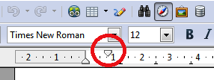
For Smashwords, select the paragraph containing the line where you want to remove the indent and click the upper slider on the ruler at the top of your screen, dragging it until it is just barely to the right of the lower slider and not quite flush with it. This gives the illusion of no first line indent, while still creating a manual indent value that is greater than 0, so your indent removal will also carry over to the Kindle version of your ebook that Smashwords creates.

ebook-formatting-2

7.  Don’t forget the end content!

If someone has downloaded your book and made it all the way to the end, this is your chance to try to maintain their interest. Here are just a few suggestions of what you can include at the end of your ebook to keep the writer/reader connection going:

  • an excerpt from an upcoming work
  • an author bio
  • links to your online network
  • links to your other books, including short blurbs for each
  • links to where the reader can post a review of the book they just read

8.  Always test your output

If you want to be confident in your formatting, you need to test the output files of your ebook after Amazon and Smashwords work their conversion magic. It’s always best to perform your testing on the actual device the reader will be using if possible, but you can also test many of the output files right on your computer. (My blog has several posts that cover this topic for the various output file types if you look under Publishing.)

For further reading, I recommend the Smashwords Style Guide (available for free). It’s written for MS Word users, but I’ve found it can still be puzzled out for OpenOffice users as well. 😉

Posted in Guest Posts | Tagged , , | 9 Comments

Book Promotion Tips for Hardcore Introverts

A lot of writers are introverts. If we weren’t, we’d probably be too busy doing extrovert things to get any writing done, right? For many of us, it’s against our nature to put ourselves out there and sell our work. But we’re told that being an author is a business (if you want to make money, anyway), and that we have to learn the marketing side of things. So, what’s an introvert to do?

Well, I’m not going to tell you to change who you are. In fact, I particularly loathe books that try to teach introverts how to be more extroverted. I subscribe the George Bernard Shaw philosophy: “The reasonable man adapts himself to the world; the unreasonable one persists in trying to adapt the world to himself. Therefore all progress depends on the unreasonable man.” Thanks to the rich and widespread online world that exists today, I think you can succeed as an author without forcing yourself into uncomfortable public venues like conventions and book signings (situations that don’t historically sell many books anyway).

For example, if my sales remain steady (and I get a couple more novels out there, which is the plan), I’m about six to twelve months away from being able to quit the day job and write fantasy as a full time gig. I’m already making what would be considered a full time income in less expensive parts of the country (or world). Granted, I’m an indie ebook author, which means I earn more per book than my traditionally published peers, but I did just get started in December 2010, so I think there’s hope for anybody!

In that time, I’ve never done a book reading, gone to a convention, handed out a business card, or (shudder) pitched myself to anyone. If you like doing those things, then by all means do so. It can only help. But this post is for my hardcore introvert colleagues who cringe at such notions. Here’s the good news: you don’t have to do any of that any more.

So, how do you get the word out about your books?

Here are a few random, scattered thoughts tips:

Use social media sites intelligently

Believe it or not, introverts can get a lot of mileage out of “social” media.

Ignore the people who try to be everywhere (Facebook, Twitter, LinkedIn, every forum, etc.), using these platforms as billboards for their stuff, sending out grating sales pitches all the time. If they’re selling books, it’s in spite of what they’re doing there rather than because of it.

So, what do you do?

1. Start a blog (if you’re like me, you’ll be most comfortable sharing your thoughts, and maybe throwing in a post or two about your books, on your own site because it’s a place people have voluntarily chosen to visit — you’re not bugging anyone in a “public” venue).

2. Pick one or two social media sites to get involved on (I’ve been on Twitter for ages — I like it since you’re forced to keep messages short so it’s not a big time sink — and I’ve recently started doing more with Facebook, since much of my target audience hangs out there).

3. Use those sites to get to know your fans (or people who, based on their profiles, might become your fans!), and also use them to promote interesting posts on your blog. People are a lot more likely to click on a link to a possibly-useful-to-them blog post than they are to click on a buy-my-book link. Then, through your blog, people can get to know your writing style and what you’re all about. (I use affiliate links to track sales that originate from my blog, and I sell more than I’d expect, given that I write about e-publishing instead of fantasy or something specifically for my target audience.)

Be generous

This isn’t necessarily an introvert or an extrovert thing, but it’s a way to promote your books without ever having to “sell” anything.

As I’ve mentioned many times, one of my first early breaks came because I turned a short story into an ebook and made it free on Smashwords, Barnes & Nobe, iTunes, etc.. I’ve also done lots of little promotions where I’ve given away 100%-off Smashwords coupons. This has resulted in lots of people going on to try my non-free ebooks.

Note, giving away freebies works especially well when they’re linked to your other books (i.e. Book 1 in a series or maybe a short story featuring characters from your first book). It’s also more useful if you have a non-free book already out and ready for people to buy. If you don’t, at least try to steer fans toward your website (and maybe an email newsletter they can sign up for, eh?). Don’t count on folks to remember your name and check back on you later. Readers read a lot, and unless they’ve read a whole series by you, it’s unlikely they’ll remember you from the dozen other authors they tried that month.

In the vein of being generous, you may want to think about pricing too. I often see new authors calculating what they have to charge and how many books they have to sell to make minimum wage or some such. (They seem to forget that most authors who make a living writing have a large body of work out there, not one or two ebooks.) Likewise, there are a lot of people fiddling with price every week, trying to figure out how much they can get away with charging without hurting sales.

I’m not going to say that’s wrong (one can argue it’s just being a good business person), but one of the benefits of the e-reader revolution is that you can make a living doing this while providing a great value to your readers too. Because of the royalty structures, it’s tough to make it selling 99-cent ebooks, but anything from $2.99 to $4.99 is still a good deal (for a full-length novel) and earns you $2+ per sale. Sell a couple of thousand books a month, and you’re making a full-time income (that sounded like a lot when I started, but the more titles you get out there, the more achievable it seems). Want to make more than that? Work on selling more.

Start a newsletter

I did a post on why authors should have newsletters, so you can check that out for more details, but essentially this is a way for you to keep in touch with your fans (especially important when you’re not the speediest writer and it can be a year or more between books) and keep your name in their minds.

It’s also something you’ll probably be comfortable doing, even if you’re an introvert. Why? As with the blog, you’re talking to people who volunteered for your newsletter (you’ll put a sign-up form on your site, and presumably it’ll be your fans who fill in the blanks), so it’s a lot easier to talk to them than random people you might meet at conventions or somewhere in the real world (again, shudder). They share your passion (your stories!), and they want to know about your books and the funny things your characters are doing.

Promote without being blatant about it

I know, I know, if you read any books about marketing, you’ll learn that you have to include a “call to action” in any newsletter or blog post you do, otherwise people won’t buy your product. Well, I don’t think that’s particularly true when it comes to fiction (do make your book covers and book sales links prominent on your site/blog), but even if it is, it’s not something we’re particularly comfortable doing as introverts. We don’t want to be pushy and bother anyone, right? I get it. Trust me.

Fortunately, you can do well with more subtle promotional techniques. If you cruise through the various posts on this blog, you’ll find a lot of articles about how to do certain things related to e-publishing and book promotion and you’ll find others about my experiences and what’s worked well for me. In the latter types of posts, I’ll always mention my own books (often with a link to the sample chapters). It makes sense because I’m using my own books and my own experiences as an example, but it’s also a sort of promotion. If someone stumbled onto my site because they wanted to know whether short stories sell better than bundled short story collections, they’ll just happen to come across a link to my novella, Flash Gold.

Sell from within your ebooks themselves

Do your ebooks stop at THE END? If so, you’re missing out on more sales. The perfect time to recommend your next book to people is…right after they finish the last one. It doesn’t need to be a hard sell either (‘cuz we introverts aren’t into that). You’re just saying, hey, if you liked this book, you might want to try my others. This reader already bought the first one, so they’re going to be much easier to “pitch” than some random reader off the street (or Twitter-o-sphere).

Here are things you can add in your afterword material:

  • A list of your other books (some high-speed e-book authors even put live links to the appropriate store’s sales page — i.e. Amazon links for Kindle ebooks)
  • An excerpt from the book that follows the one the reader just finished.
  • Your website and/or email.
  • Your social media links (Facebook, Twitter, etc.)
  • The link to your newsletter sign-up page (and a quick note on why it would benefit readers to sign up). I just started doing this with the release of Hunted, and I’ve had as many signups in the last month as in the previous four. Kind of a “duh” moment, I know.
  • A polite request for reviews. Most people aren’t into reviewing, but if you ask, some folks who wouldn’t otherwise bother will take the time to leave one. I’ve done this since the beginning, and I know it works because I have lots of reviews from readers who hardly review anything on Amazon, but they were kind enough to leave a write-up for me.

All right, this post has moved into novella-length territory, so I’ll turn the rest over to you all…

Do you have any promotion tips for introverts?

Posted in Book Marketing | Tagged , , | 17 Comments

How to Add a Newsletter to Your Blog or Website

NewsletterLast week, I argued that authors should maintain newsletters, so they can email their fans when they have new books out or have other fun news they want to share. A couple of folks said, “Ok. How?”

So, here’s a little more of the how-to on starting a newsletter and including a signup form on your site. It’ll be different depending on who you go with and where you host your blog (if you want to install it on a blog), so I’ll keep things basic.

Sign up with a newsletter service

There are free ones out there that are perfectly fine if you’re just getting started (they can get you pretty darned far, actually!), though the tradeoff is that you’ll usually have advertising or something like inserted at the end of your newsletters. For an indie on a budget, that’s probably not going to be a problem.

I’ll mention the provider I use first and then another one I’ve heard authors recommend (mine costs money, but the other one has a free option that’s available for those with less than 1,000 subscribers).

The service I use is Aweber, and the main reason was that I already had an account there because of the day job. They’re the gold standard when it comes to mailing list providers, but they’re pricy at $15 a month and offer more services than we generally need as authors (Examples include click tracking, the option to host multiple newsletters, and the ability to create series of scheduled “broadcasts” that can go out automatically to a new subscriber at intervals. They also have a huge selection of video webinars to educate you on marketing with newsletters).

If you know right away that you’ll quickly reach 1,000 subscribers, or if you have multiple pen names and want to easily manage newsletter lists for each under one account, you might check into Aweber.

If not, here’s another option:

YMLP (Your Mailing List Provider) has a free level that might very well do everything you need. As I said, you can have up to 1,000 subscribers and send up to 25 emails a month. For many authors, that may be plenty. (I’m not anywhere near 1,000 subscribers yet myself, though I hope to be by this time next year!).

Add a form to your site/blog

Both of the services I mentioned have form-creation wizards. You can pick out a background and what fields you want people to enter (name and email should be sufficient), and it’ll give you a snippet of code to place on your site.

How to insert that code will vary, depending on your blog platform, but for WordPress, I created a new “text” widget, pasted the code into it, and added it to my sidebar (I’ve done this on Blogger and Typepad, too, so I imagine it’s possible everywhere).

How do you get people to sign up for your newsletter?

The cool thing about being an author is that people searching for your website are probably already fans. They’ve read your books, and they’re interested in learning more about you or perhaps when the next book comes out. You shouldn’t have to sell them too hard on your newsletter.

That said, you can do the tried-and-true internet marketer’s method of acquiring newsletter subscribers: give something away for free to folks who sign up. Perhaps a short story or some kind of special fans-only extra? It’s up to you.

I ran a contest when I first started up my newsletter, though I’ve had more success just by making the form prominent on the “book news” page of my site as well as including it in the side bar (whenever I get around to having a pro design this site, I’ll definitely make sure the newsletter form ends up “above the fold” on all the pages). I also added a signup to the Facebook fan page I built a couple of weeks ago, and I’ve had a couple of new subscribers come in from there.

That’s all there is to starting a newsletter. It’s much easier than formatting an ebook or editing your manuscript or any of the other things you’ve done as an author!

Posted in Tips and Tricks | Tagged , | 9 Comments

To ePublish or not to ePublish – eBooks vs Traditional Print

I’ve got a lot going on this week, so I’m glad to welcome a couple of guest posters. Today, Daniel Brent Ruyter is going to chat about e-publishing versus the traditional model. If you get a chance, check out his sites or leave a comment below. Thanks!

Daniel Ruyter is single dad, author, blogger, cupcake addict and pseudo techno nerd. He writes for Memoirs of a Single Dad and Man Made Reviews about dating, parenting, technology and reviews — all from a guy’s perspective.

To ePublish or not to ePublish – eBooks vs Traditional Print

Authors and aspiring authors are experiencing a bit of a renaissance of sorts. There aren’t necessarily more of them around – I’m not sure a count would even be possible. There are more opportunities for authors and potential authors, though, at least in part because of the explosion of eBooks and electronic publishing. But there are a number of factors that are involved in determining which publishing method is right for each author.

First and Foremost – Consider the Cost

There are costs associated to both publishing methods and with each, you can publish on a budget or you can just about throw as much money as you’d like to into the publication. Electronic publishing tends to be less expensive than traditional publishing because there isn’t as much overhead cost involved as there is in traditional publishing. At a very high level, the costs associated to ePublishing are limited to book layout, book cover and marketing. A savvy computer user may be able to design the layout of the book with a little assistance from a few online resources. Book cover designs can be done for a few dollars up to a few thousand – again, depending on the desired budget. Marketing and promotion is in the same boat. You can self-promote and spend primarily your time or you can hire outside help in the form of a publicist or PR firm to assist.

Traditional publishing has ‘sunken’ costs involved that just aren’t present in electronic publishing. Books actually need to be made, therefore physical materials and printing costs must be included no matter if one copy or a million copies are sold. Depending on the publisher, costs can be shared or deferred in lieu of sales, but this is rare in most cases. Base costs in publishing a physical book can easily start in the thousands with the sky being the limit to design, cover and marketing costs.

Consider the Audience

Old school – a word that means different things to different people. For some, it can bring back thoughts of nostalgia and days gone by. For others, old school means antiquated and outdated. Traditional publishing has gone the way of the old-school moniker, but that doesn’t mean that old can’t be ‘in’. The proliferation of eBooks isn’t necessarily entirely positive. There’s a certain level of prestige to having a book in actual print and not just available for download. Some people would be more inclined to purchase an eBook while others will always prefer to hold the printed book in their hands. Your audience should definitely be a consideration before you choose your publishing method.

Consider the Topic’s Shelf Life

The subject of the book should be another primary consideration when choosing a publication method for your book. What is the shelf life of your subject matter? For example, fictional works often have a longer shelf life than non-fiction works like technology publications and trendy topics that are hot in the moment but may lose popularity over time.

What are your experiences in publishing a book? Have you published or are you an aspiring author? What advice do you have for budding writers as they venture down the unknown road of publication?


Posted in Guest Posts | Tagged , , | 9 Comments

The Emperor’s Edge Podiobook Is Up and Running

Just a quick post today to let you know that the first few chapters of The Emperor’s Edge podiobook are online for your listening pleasure. It’s free to download them, and we’ll be running the whole book through over the course of the fall.

You can listen online or (more fun) subscribe and get the episodes automatically downloaded to your iPod or other mp3 player.

Thanks for checking it out!

Posted in My Ebooks | Tagged , | 5 Comments

Tweaking Your Ebook “Packaging” to Increase Sales

If you feel like you’re sending lots of visitors to your Amazon ebook pages, and it’s not resulting in many sales, you may want to make some changes. While you’re probably not going to tinker with the story itself (although some ebook authors do!), it’s a simple matter to upload a new cover image or blurb, or to change the price.

At the beginning of August, I uploaded new cover art for Encrypted and trimmed a couple of sentences from the blurb (more details on the changes I tried in this post). While I can’t say that my tweaks drove sales through the roof, they did resulted in an increase.

Prior to August, Encrypted’s best sales month came in June where it sold 340 copies on Amazon. It broke that number a couple of days ago and will probably end up selling about 400 copies by the end of August. (No, that doesn’t include sales at Barnes & Noble and Smashwords and such, but those guys don’t break down monthly sales for each ebook, so it’s a little more work to calculate totals. Also, Amazon is the big kahuna and represents 80-90% of my sales, so I worry most about them.) Since I make about $2 on each sale, that means the new cover art will already be paid for with the increased sales from this month.

In case you’re wondering, sales for the rest of my ebooks remained fairly steady for August. With one exception (which I’ll touch on in a minute), they may even end up down a smidgen. (I’ve heard summer isn’t typically as busy of a time for book sellers, so we’ll see if things pick up this fall.) I also didn’t promote Encrypted any more than usual. It came out in January, and I don’t tend to plug it as much as The Emperor’s Edge or Flash Gold, since those two are Book 1s in series I’m working on. In short, I believe it’s safe to credit the new artwork and perhaps, to some extent, the new blurb for the increased sales.

I’m not usually great when it comes to “split testing” and making these types of changes (I’m always hesitant to try something that might harm sales), but it’s worth tinkering with the “packaging” if you’re wondering why your book isn’t selling more copies. It’s one thing if you’re just not marketing it, but if you feel like you’re putting a lot of work into promotion and nothing is happening, some changes may make a difference.

Ask friends, too, to give you their opinion on your book’s sales page. It’s hard for us to judge these things ourselves. You could run a couple of different blurbs by them to see what strikes a cord. I’ll be the first to admit that writing a blurb doesn’t necessarily come naturally to authors. It’s more akin to copywriting than storytelling.

My other improved seller for August

Because I know you’re wondering, the other ebook that saw a noticeable increase in sales this month was my children’s short story collection, The Goblin Brothers Adventures. I haven’t marketed that one at all since I switched my focus to my adult fantasy novels, and it usually only sells about 25 copies a month at Amazon.

The Goblin Brothers have sold 46 copies so far this month (more than they have since their release back in December when I was bribing all my friends and relatives to buy them).

What changed? Not much. Just a tweak to the title.

Before, I’d titled it “The Goblin Brothers Adventures (middle grade fantasy stories),” figuring that adding the parenthetical aside would help it place in Amazon’s internal search engine (in case someone was looking for middle grade reading material). As I recall that worked, and it was the first result for “middle grade fantasy,” but the sales numbers suggest there aren’t all that many people searching for “middle grade fantasy.” So, I took that aside off, and it’s now just The Goblin Brothers Adventures.

I changed the title because I thought more of my adult fantasy readers might give it a try if it wasn’t labeled as something for kids. It’s still apparent from the blurb that the characters are young and the stories are suitable for all ages, but I’ve had lots of adults like them, so why pigeonhole these poor goblins?

It seems to have worked, for that little change has nearly doubled sales for that title this month. Sure, the ebook is still my least impressive seller by far, but every little bit counts when you’re dreaming of writing for a living someday. It’s easier to make more money from the books you already have out than to write all new ones (though, of course, I’m doing that too).

For those of you still reading (how do my posts always get so long?), have you tried tweaking your “packaging” to increase sales? Do you have any success stories to share?

Posted in E-publishing | Tagged , , , | 12 Comments

Ebook Formatting with XHTML and Calibre by Paul Salvette

America-Goes-On-By-Paul-SalvetteLast week, we had a guest post on a simple way to get your ebook formatted without worrying about dinking around with HTML or special software tools. Today, Paul Salvette is going to give us a more in-depth version for those who like to control every aspect and don’t mind reading some guides and getting into the nitty gritty of customizing their ebooks.

This kind of ebook formatting is a big topic for one guest post, so many of the links here will take you over to Paul’s site where he’s written up detailed formatting guides. While you’re there (or here), check out his first novella, America Goes On.

Ebook Formatting with HTML and Calibre

Thanks to Lindsay for letting me out of the cage here in Thailand to do a guest post. I write this eBook formatting post, not as an eBook author, but as a reader. I am getting a bit perturbed by all the eBooks out there with that have shoddy formatting: changing fonts, goofy page breaks, busted hyperlinks, etc. Self-publishers get ridiculed for being unprofessional by the suits in New York City, but I’ve found these errors in eBooks I shelled out $9.99 for from major publishing houses! There is no excuse to treat the customer with such contempt.

That is why those of us who self-publish have a real chance to set the standard for proper eBook formatting. You don’t have to be a nerd (although it helps) and you don’t need to spend a lot of time. If you have spent months writing, marketing, and updating your twitter feed 40 times a day to make it big as a self-publisher, you can take the time to format an eBook properly. I did it with my debut novella, America Goes On, and you can do it too.

First off, you have to think about eBooks differently from regular books and even the manuscript sitting in your word processor. While your word processor has a defined font, defined number of pages, and a fixed layout, and eBook has what’s called reflowable text. That means no matter what the dimensions of the eReading device, the text will wrap neatly into the next line. Not coincidentally, this is how a web browser reads HTML code. Try pressing Ctrl-U right now to see the source code of Lindsay’s most excellent blog. It may look a bit daunting, but you basically want to turn that manuscript in your word processor into this type of code.

There are two basic types of eBook formats that are commonly in use right now. There are the MOBI/PRC/AZW formats, which are primarily the domain of the Amazon.com Kindle Store. And then there is the EPUB format, which is used by everybody else (iBookstore, Barnes & Noble NOOK, etc.) It should be noted that Smashwords is a special beast, because it requires that you upload a document in Microsoft Word for their meatgrinder, which converts your manuscript into the major formats for distribution. Both MOBI and EPUB are based on old and simple HTML code that geeks were using to write Star Trek fan fiction on the internet back in the mid-90s. It’s really nothing too advanced.

The first step toward getting your manuscript converted into an eBook is obtaining some free tools. This includes a good text editor (I like Notepad++) and an open source program called Calibre which converts HTML into EPUB and MOBI. Next, you need to learn a little bit about HTML programming, and more specifically XHTML programming (XHTML has more robust standards than its cousin HTML). Don’t worry, you don’t need to be like Matthew Broderick in WarGames and hack into the computer at NORAD. You just need to have a basic knowledge of XHTML to include properly wrapping text in paragraph tags (<p> and </p>), adding styles to text (such as different font-sizes), adding margins around text, aligning text, and maybe even how to add images. Basically, every basic function you do in your word processor, you need to learn how to do in XHTML. I whipped up an XHTML tutorial for those of us who didn’t receive daily wedgies in high school, and it’s very easy to follow. If you get confused, drop me a comment and I’ll be happy to help.

Once you know the basics of XHTML, you need to take the entire manuscript out of your word processor and into a text editor. Once you are in a text editor, you can guarantee that you will have perfectly clean XHTML code. Word processor’s like to leave nasty bits of formatting and corruption within your seemingly beautiful manuscript. This crap that gets hidden in your word processor will make your eBook look all screwed up on certain eReaders, guaranteeing that your readers will NOT come back and purchase your other works. If you work from a simple text editor, you can guarantee a perfect eBook. There are some tips, tricks, and best practices regarding copying a manuscript into a text editor and then coding XHTML inside the text editor. You can learn more about taking a sloppy manuscript and turning it into perfect XHTML in another tutorial I prepared for indie authors.

Once you have the XHTML file for your book, you can run it through Calibre to get a MOBI and EPUB file that is ready to upload to the major markets. Calibre has some features on it that you need to familiarize yourself with, but I whipped up another tutorial that helps indie authors work with Calibre. However, it is a very user-friendly program. If you really want to geek out, you can even learn about regular expressions, which helps find and manipulate complex strings of text inside your text editor. This knowledge can cut your formatting time in half. You can also get real fancy and learn about building an EPUB from the ground up (without Calibre) and converting it into MOBI with a free program called KindleGen.

Whatever path you choose, there is no excuse for a sloppy eBook. It takes years to learn how to write well, but it only takes a few days to learn how to format an eBook well. hese knuckleheads charging $150 to format fiction should be ashamed of themselves. It took me less than an hour to format my first novella, and you can watch me do it on these video tutorials. I can only think of one other job where you can make $150 for less than an hour of work, and I don’t look that good in knee-high boots and a pink skirt.

I hope this gives you a decent overview of what’s in store for you when formatting an eBook, and these tutorials I hope will be useful for those of us in the self-publishing community. Please let me know if you have any questions, and drop me a line on Twitter or at my website. I’m happy to help, and I won’t charge you a $150. Good luck formatting your eBook!

Posted in Guest Posts | Tagged , , , , , , , | 15 Comments

Authors, Why You Should Start a Newsletter

newsletterYour books are published, you’re building a social media presence, and you’ve got an official author website and/or blog. You’re rocking it! But…do you have a newsletter?

I know what you’re thinking:

What? More book promotion I have to do? When will I have time to write the next book??

But keep reading. It’s worth starting a newsletter, and it needn’t be a big time investment.

First off, what is a newsletter exactly?

Glad you asked. A newsletter is when you add a form to your website (or blog) where visitors can sign up (opt in), thus agreeing to receive periodic email messages from you. Their names and email addresses are compiled into a mailing list, and you can then “broadcast” a message to your entire list at once.

What you write in those newsletters is up to you. If you’re an author, the people who sign up are going to be fans, probably fans who’ve read many of your books and enjoyed them enough to hunt down your website and give you their email addresses.

Think of your newsletter subscribers as your inner circle. What cool things can you do to reward them for being fans?

At the very least, you can let them be among the first to know when you have a new book coming out. Maybe you can even give them coupons for discounts or let them take advantage of a low initial ebook price (i.e. you might sell your novel at $2.99 for the first couple of weeks before raising the price to $4.99).

I haven’t had my newsletter going for very long, but I’ve been trying to send out a note once a month. If I’m releasing a new ebook that month, the subject of the email is a no-brainer. In June, I released Dark Currents and sent my subscribers a Smashwords coupon to download it for free (a lot of them bought it at Amazon or Barnes & Noble anyway). This was nice for them, and it also helped me get some early reviews of the book.

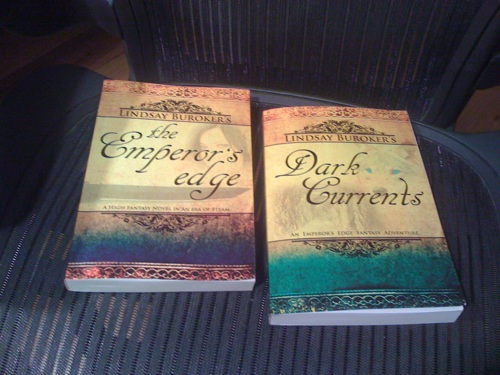
I’ve also given away other people’s ebooks for free (in July, I asked a couple of other indie fantasy authors to give me Smashwords coupons — a way to help promote their books to my readers — and I sent those out to my subscribers). In September, I’m planning to do a giveaway, since I should have paperbacks of The Emperor’s Edge and Dark Currents ready to go by then. I can’t wait to sign some copies and send them off to folks.

What’s in it for you?

Okay, you’re thinking, you could start a newsletter, and you could give things away, but why? How is that helping you sell books if you’re just writing to people who are already fans?

First off, as I mentioned, a newsletter is a way to let your core fans know when you have a new book out. More than that, having the emails of hundreds of readers can give you the power to get a bunch of people buying your new releases at once.

Authors more popular than I am (hey, maybe I’ll be there someday!) have used their newsletter subscribers to shoot their latest books to the tops of the bestseller lists at Amazon. This gets their books noticed by lots of other people (who aren’t newsletter subscribers and just happen to browse the bestseller charts, looking for new books to try). I’ve heard it’s nice up there at the top of those lists. 😉

Sending newsletters out to your fans is also a way to keep your name in their minds, something that can be especially useful if you’re not the most prolific writer. They’ll probably be more likely to recommend your books to friends if you’re able to stay on their radar. Otherwise, they might forget all about you in the interim between publications. And if they forget about you, they won’t remember to keep an eye out for future books from you.

Always remember, it’s easier to sell to an existing fan than to convince a new reader to try your work.

I’ll cover how to start a newsletter in a future post. In the meantime, please let us know if you’ve started one of your own or if you’re planning to soon.

Update: How to Add a Newsletter to Your Blog or Website

Posted in Book Marketing | Tagged , , | 17 Comments